Sailors

Every voyage you ever logged, on one map you can actually search.
Open paper logbook on a chart table with compass, sextant and coffee mug

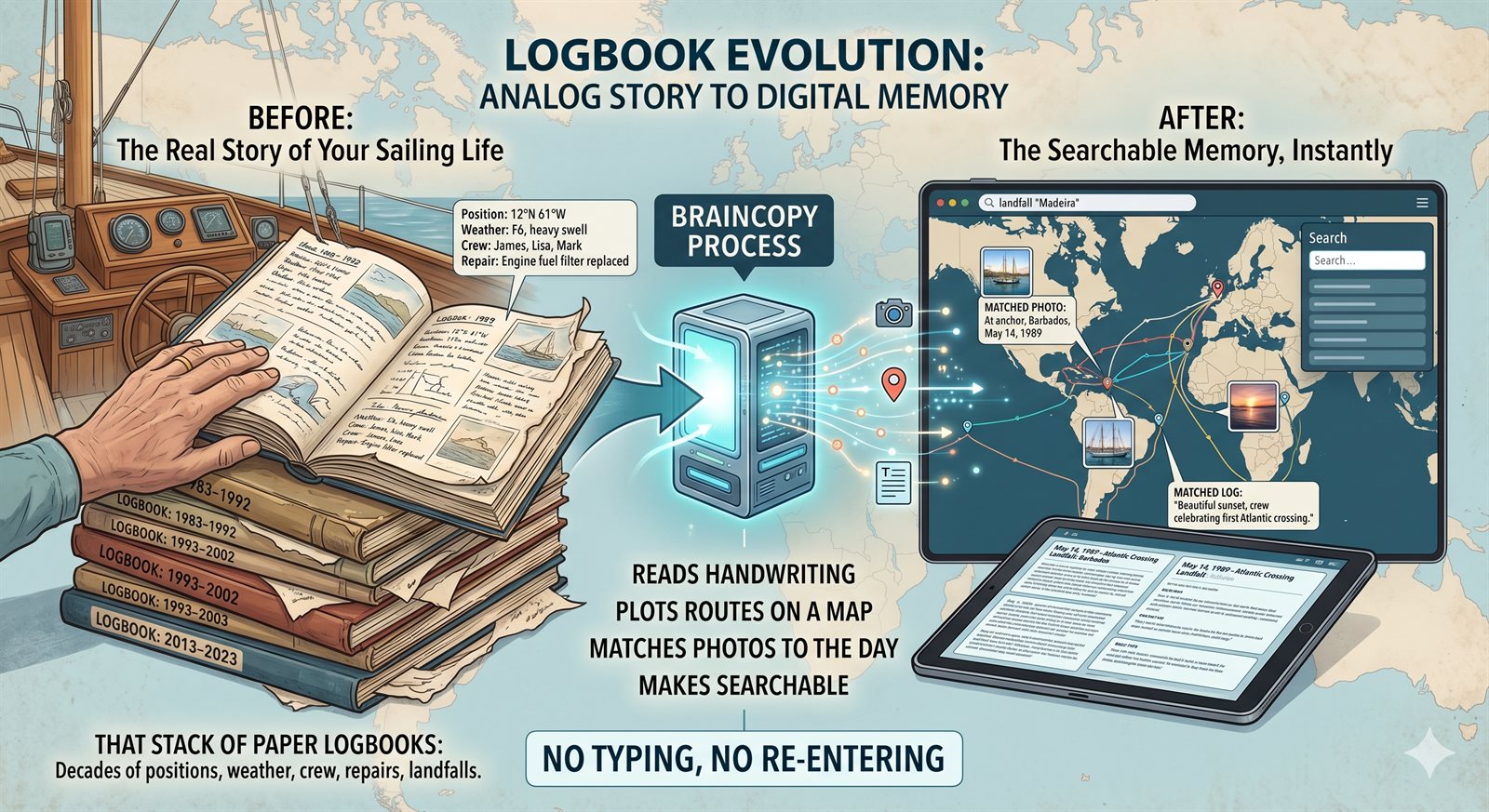
That stack of paper logbooks in the nav station — decades of positions, weather, crew, repairs, landfalls — is the real story of your sailing life. BrainCopy reads the handwriting, plots the routes on a map, matches the photos to the right day, and makes the whole thing searchable. No typing, no re-entering.

The problem

You have the logbooks — some faded, some water-stained, some from a boat you sold twenty years ago. They contain the best parts of your sailing life: the night you made landfall at Horta, the storm off Cape Finisterre, the crew who joined you for one unforgettable leg. But they're trapped on paper. You can't search them. You can't share a specific voyage with grandkids. You can't cross-reference them with the hundreds of photos from the same trips.

Typing it all in is out of the question — that's hundreds of hours of data entry for a thousand entries. And generic scanning apps give you searchable text at best, not a route on a map, not your photos matched up to the right day, not the story.

Meanwhile the logbooks keep ageing. Water leaks, moves, fires, estate clear-outs. Once they're gone, they're gone.

How BrainCopy solves it

Snap the pages — we do the reading

Take photos of logbook pages the way you'd photograph a document. BrainCopy's handwriting OCR is specifically tuned for navigation logbooks: structured grids with times, coordinates, courses, speeds, wind, barometer, plus narrative remarks. For two-page spreads, we auto-rotate and split them. For page grids the OCR tiles into top/bottom halves to get the cell-level data that single-pass OCR misses.

Routes plotted automatically

Extracted coordinates become waypoints; waypoints become a route on an interactive map. Anchors are detected where the vessel sits in the same position for hours. Common digit misreads (that 36°N that was obviously 46°N) get flagged. If you import your voyage photos with GPS, we use them as ground-truth to correct misread coordinates and reconstruct the real route.

Photos matched to the right day

Import the photos (Google Photos, iCloud, loose files). BrainCopy places each one on your voyage timeline by date and GPS, so the photo from the rail at sunset ends up on the same page as the log entry that describes it. No manual tagging.

Searchable voyages, shareable chapters

Search "Azores" and get every mention across every logbook, with the photos from those trips and the crew who were aboard. Export a specific voyage as a photobook to give to a former crew member, or as a narrative diary chapter.

Your handwritten archive, preserved

The original scans stay in your own cloud storage (EU-hosted Nextcloud we provision for you). Even if you stop using BrainCopy, your photos of the pages are yours. This matters: many sailors are digitising logbooks precisely because the originals are irreplaceable.

Optional: ask your AI about your sailing life

BrainCopy exposes your very own MCP server (MCP = Model Context Protocol — an open standard that lets AI assistants like Claude and ChatGPT read data from systems you control). "Summarise every night watch I stood north of 60° N." "Which crew sailed the most miles with me?" "Show the wind data from the delivery from La Rochelle."

What you'll actually see

Beta price for Sailors

50% off the €10/month subscription, forever, for sailors who join during the beta. Your discount never expires.

SAILORS50

Start with SAILORS50 See full pricing

FAQ

How accurate is the handwriting OCR on old logbooks?
BrainCopy uses Claude Vision tuned specifically for logbooks: tiled OCR (top/bottom halves at 2048px each), grid-aware reading (printed column headers → columns → cells), and photo cross-referencing when you have GPS-tagged photos from the same voyage. On Henrik's own 24-page 1990s logbook (French/Swedish mix, faded pencil) we extracted 82% more text than single-pass OCR, with misread coordinates corrected against real photo positions. Fountain pen and clear ballpoint handwriting read best; heavy water-damage is still a limit.
Do I have to type anything?
No. Just photograph the pages (phone camera is fine). BrainCopy does the rest. You can optionally review and edit the extracted data before it's saved to your voyage timeline.
What about mixed languages?
OCR is language-aware — set your preferred languages in Settings (Swedish + English + French + German, etc.) and the prompts adjust. Diacritics (å, ä, ö, é, ñ) are preserved correctly.
Can I import photos from multiple sources?
Yes. Google Photos (via OAuth), iCloud exports, Facebook, loose folders, anything on a drive. BrainCopy de-duplicates by content hash across all sources so photos imported twice from different places collapse into one record.
Where is my data stored?
Your files (logbook scans, photos) go to a Nextcloud account we provision for you on European infrastructure (Hetzner, Germany). Your database rows sit in EU-hosted MySQL. No US cloud handles your content.
What does it cost?
Subscription is €10/month (with SAILORS50: €5/month, forever). Includes 100 GB of EU storage, sync client, daily digest, weekly review, extended upload time. OCR is priced per page — typically €5–€25 for a multi-year logbook archive. Face recognition and AI vision on photos are separate, per-use, each with exact cost calculation from your data.
Can I export my data if I stop using BrainCopy?
Yes — your original scans are in your own Nextcloud account (you can keep that even if you cancel). Diary entries, waypoints and photos export as structured JSON or a printable photobook. Nothing locks you in.

Ready to try it?

Takes about 30 seconds to sign up. You can start importing immediately.

Start your sailor trial

Who else uses BrainCopy

Different people, same problem: too many memories scattered across too many places.